

What is email deliverability?
Email deliverability is the ability of your emails to successfully land in your subscribers’ primary inbox. Not just reach their mail server, but actually show up where they look and engage.
Think of it like shipping a package. Email delivery is the truck arriving at the building. Email deliverability is the package actually making it to the right apartment, not getting lost in the mail room or thrown in the trash.
As a metric, email deliverability is measured by inbox placement rate, the percentage of your sent emails that land in the primary inbox versus the spam folder or other tabs.
At Retention Side, we have onboarded enough eCommerce brands to say with confidence: a team of 20 world-class marketing experts can’t do anything with your email marketing channel if you have a poor deliverability rate. The guide below is here to fix that.
Deliverability vs. Delivery: not the same thing
Before we dive deeper into this issue, it is important to understand the difference between deliverability and delivery. This is one of the most common points of confusion in email marketing, and since people don’t know the difference, they assume there is no issue with their account.
Email delivery simply means your email was accepted by the recipient’s mail server. It did not bounce. That is it. Your email marketing platform will report this as your delivery rate, and on most platforms, it looks great. 98%, 99%. Brands see this number and feel safe. They should not.
Email deliverability is about what happens after delivery. Did that email land in the inbox, the Promotions tab, or the spam folder? Delivery rate tells you nothing about that. You can have a 100% delivery rate and still have 90% of your emails going straight to spam, completely invisible to your customers.
Inbox, Promotions, Spam: the three placements explained
When an email arrives at inbox account, it gets sorted into one of three main destinations. Understanding the difference is essential for any eCommerce email strategy.
Primary Inbox
This is the goal. The primary inbox is where personal emails, important messages, and subscriptions the recipient has actively engaged with end up. Emails in the primary inbox get seen first, trigger mobile push notifications, and compete against far fewer messages.
Brands that consistently land in the primary inbox see significantly higher open and click rates and higher revenue, simply because the visibility is incomparably better.
Promotions Tab
The Promotions tab is Gmail’s default destination for most marketing emails from brands. It is not spam, subscribers can and do check it (sometimes), especially when they are in a shopping mindset or looking for a deal.
But it comes with two major disadvantages: it does not trigger mobile push notifications, and it is a crowded tab where your email is competing against dozens of other promotional messages.
Spam
This means your email was filtered out entirely. Your subscriber never sees it. This happens when inbox providers flag your email based on poor authentication, high complaint rates, spammy content signals, or a damaged sender reputation.
Every email that lands in spam is lost revenue, a campaign that was paid for, designed, written, and scheduled, but never delivered on its purpose.
Why high deliverability directly impacts revenue?
This is not an abstract technical concern. Deliverability is a revenue issue. Consider this: if your email list has 100,000 engaged subscribers and 30% of your emails are going to spam, you are effectively sending campaigns to 70,000 people, not 100,000. And you are paying for the full list.
Every percentage point of inbox placement is directly tied to the number of subscribers who can actually see, open, and buy from your emails.
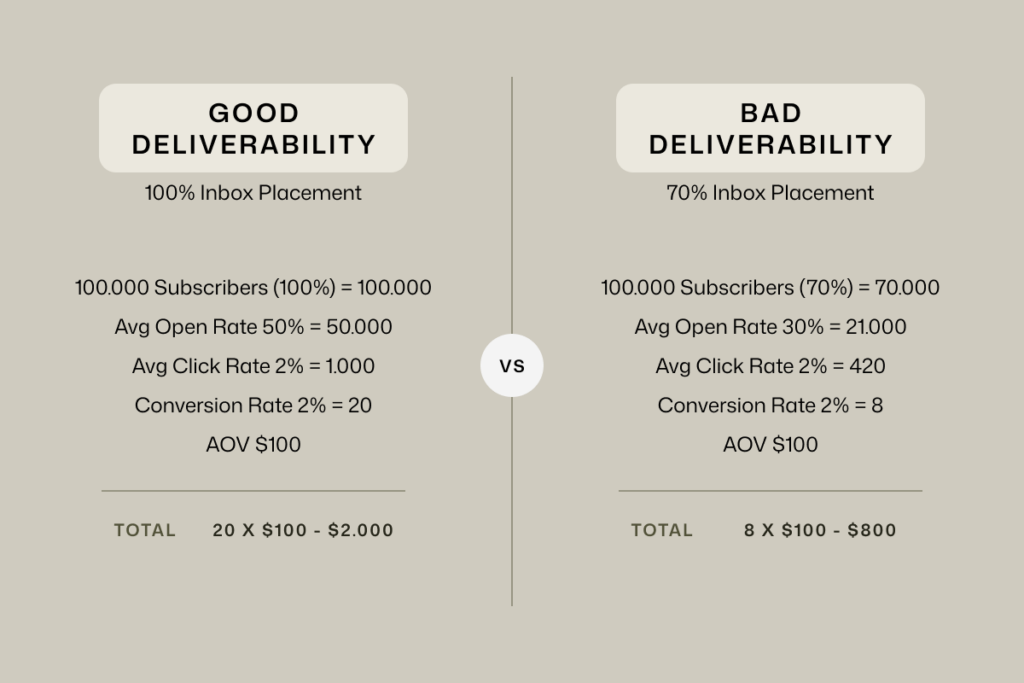
Our work across eCommerce brands consistently shows that deliverability improvements produce revenue lifts that no subject line or creative test can match. When more emails reach the inbox, every other metric improves downstream. The lever is upstream, but the results show up everywhere.
What changed in 2026?
Inbox providers have spent the last few years prioritizing their users, not accommodating senders. Every major update from Gmail, Yahoo, and Microsoft over this period has moved in the same direction. Tighter filters. Stricter requirements. Less tolerance for senders who do not meet the bar.
That bar is now firmly set. All major inbox providers require bulk senders to have proper email authentication in place. SPF, DKIM, and DMARC are mandatory. One-click unsubscribe is mandatory. Keeping your spam complaint rate under 0.3% is mandatory. These are not best practices anymore. They are the entry ticket.
But 2026 brings new challenges: even a perfect technical setup is no longer enough on its own. Engagement signals are becoming the dominant factor in inbox placement decisions. How do subscribers react to your emails? Whether they open, click, or delete your emails without reading them is now what inbox providers weigh heavily.
This all is still manageable, and we cover it all in the sections below, so just keep reading and follow our step-by-step instructions.
Common mistakes eCom brands are making right now
After auditing dozens of eCommerce email programs, the same problems come up again and again. None of them is complicated. All of them are fixable.
Sending to the full list, every time
Brands build a list, then blast every campaign to every subscriber regardless of how long it has been since they last engaged. Inbox providers track this.
When a large portion of your recipients are not opening, not clicking, and occasionally marking you as spam, your sender reputation takes damage with every single send. Volume is not the same as reach.
Sending to fewer, more engaged subscribers will almost always outperform blasting the full list.
Sending from a shared sending domain
When you create a Klaviyo account, the platform assigns you a shared sending domain by default. Shared sending domain means you are sending emails from the same domain as potentially hundreds of other Klaviyo accounts.
Their sending behavior directly affects your reputation. If other brands on that shared domain are generating high spam complaints or poor engagement, you absorb part of that damage, even if you follow all best practices.
Not cleaning your list
Inactive subscribers, people who have not opened or clicked in months, do not look like a problem on the surface. They are not bouncing. They are not complaining. But they are quietly dragging down your engagement metrics with every campaign you send to them, which signals to inbox providers that your emails are not wanted.
Removing them from your list will help you, one, increase your deliverability reputation and, two, reduce ESP costs, as you are no longer paying for them.
Step-by-step guide to high deliverability
Step 1: Set up a dedicated sending domain
Do not send marketing emails from your main business domain (yourstore.com). Use a dedicated subdomain, something like send.yourstore.com or email.yourstore.com. This protects your root domain’s reputation from your email marketing activity.
If your sending reputation ever takes damage, it stays contained to the subdomain, and your main domain remains clean.
Also, this helps you to move from the Shared Sending Domain, which we explained in the section above.
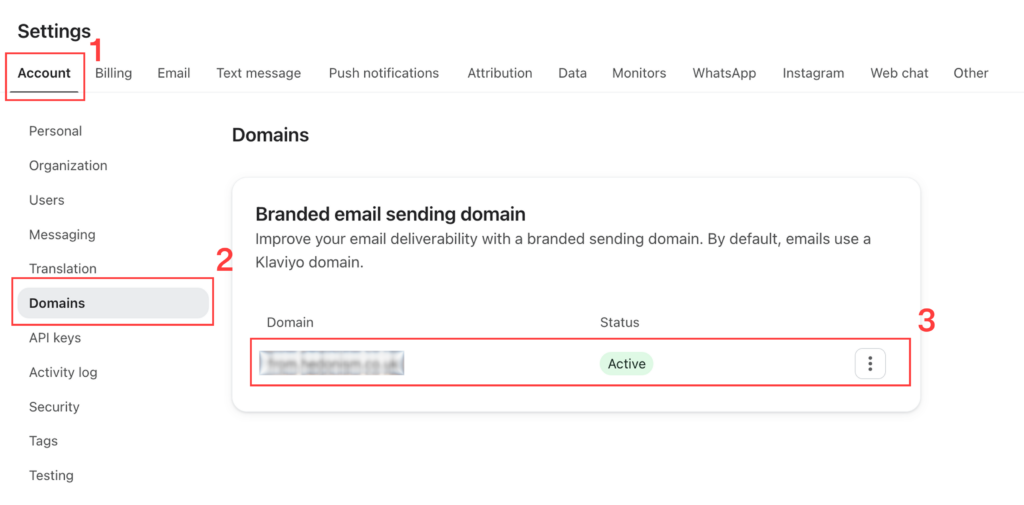
In Klaviyo, this is set up under Account Settings > Account > Domains.
Step 2: Configure your DNS authentication records (SPF, DKIM, DMARC)
SPF (Sender Policy Framework) is a DNS TXT record that lists which mail servers and IP addresses are authorized to send emails on behalf of your domain. If a sending server is not on that list, the email fails SPF and is significantly more likely to be filtered.
DKIM (DomainKeys Identified Mail) adds a cryptographic signature to your email’s header that receiving servers use to confirm the email has not been altered in transit and genuinely came from your domain. Most ESPs, including Klaviyo, manage your DKIM keys for you – you just need to publish the DNS records they provide.
DMARC (Domain-based Message Authentication, Reporting & Conformance) ties SPF and DKIM together and tells inbox providers what to do with emails that fail those checks. Start at p=none, review your aggregate reports to catch any misconfigured email streams, then move to p=quarantine and eventually p=reject once everything is correctly aligned.
A free tool to check your current setup: MXToolbox.
Step 3: Warm up your sending domain
A new domain (subdomain) has zero reputation history. Sending at full volume immediately looks exactly like what spam senders do. Your job is to show inbox providers (Gmail, Yahoo, Outlook) that their users love your emails. Start small and scale gradually, always sending to your most engaged subscribers first:
- Week 1: Only the most engaged (multiple opens and clicks)
- Week 2: Gradually reducing the number of engaged requirements
- Week 3: Regular engaged segments (Last 60/90 Days)
- Week 4+: Broad engaged segments (Last 120/150 Days)
If you are switching ESPs rather than starting fresh, you still need a warmup period. Plan for at least 2 to 4 weeks before opening up to your full engaged list.
Step 4: Segment by inbox provider
Gmail, Yahoo, Outlook, and others use different filtering systems. Build provider-specific segments in Klaviyo by filtering profiles by email domain. Monitor performance separately for each. If one provider is underperforming, that points you directly toward the right fix.
Step 5: Create Exclusion Segments
An additional layer of protection that will prevent sending emails from people who might be recently engaged, but they did send a strong signal to their inbox provider that you are not welcome in their inbox anymore. This signal is Mark as Spam.
Step 6: Keep your list clean
List hygiene is not a one-time task, it is an ongoing practice. Regularly remove subscribers who showed strong unengagement signals. Additionally, create Sunset Flow to help you automate this process.
How to monitor your deliverability results?
Setting up a strong deliverability foundation is one thing. Maintaining it requires consistent monitoring. Here is what to track and how often.
Google Postmaster Tools
Google Postmaster (postmaster.google.com) is a free tool that gives you direct visibility into how Gmail is treating your emails. It shows your domain reputation, IP reputation, spam complaint rate, and authentication pass rates, all in one place.
Microsoft SNDS
Microsoft’s Smart Network Data Services (SNDS) is the Outlook and Hotmail equivalent of Postmaster Tools. It is also free and gives you data on your sending reputation and complaint signals specifically for Microsoft mailboxes.
Klaviyo Deliverability Dashboard
Klaviyo’s Deliverability Hub tracks all engagement metrics across your campaigns and flows, both positive signals like opens and clicks, and negative ones like spam complaints and bounces.
If a specific campaign or flow email is creating deliverability issues, Klaviyo will flag it directly so you know exactly where the problem is coming from.
How to get out of the Promotions tab?
As we already know, landing in the Promotions tab means your subscribers are not getting mobile push notifications from your emails, and your campaigns are competing against dozens of other brands in a tab most people scroll through passively.
The most effective solution we have seen for eCommerce brands is Maverick’s Inbox Placement Optimizer (trymaverick.com).
Gmail parses the underlying code of every email to decide where it belongs, and Maverick adjusts that structure in ways that consistently improve primary inbox placement, without changing anything about how the email looks to your subscriber.
It integrates directly with Klaviyo, runs entirely in the background, and requires no ongoing work from your team.
Conclusion: Deliverability is not technical overhead, it is revenue infrastructure!
Here is the bottom line: every email that does not land in the inbox is a lost opportunity. All the efforts put in this channel, along with $$$ invested, are completely wasted if deliverability is not in place.
The brands that get this right have a compounding advantage over brands that treat deliverability as an afterthought.
If you want help auditing your current deliverability setup and building a program that actually reaches your subscribers, reach out to Retention Side or similar email marketing agencies.