


If your Klaviyo campaigns show as “sent” but revenue keeps dropping, the platform isn’t broken. Something between Klaviyo and the inbox is broken, and that something is almost always fixable once you know where to look.
We see this constantly with brands doing $300k+ a month who come to us assuming Klaviyo itself failed. In reality, Klaviyo did exactly what it was told to do: it handed the email off to Gmail, Yahoo, or Outlook. What happens after that handoff is entirely up to the inbox provider’s own filtering system, and that system is scoring your domain, not just your subject line.
This article walks through the real mechanics of why Klaviyo emails go to spam, how to diagnose the actual cause instead of guessing, and what to fix first when revenue from email starts sliding.
Key takeaways
- Delivery and deliverability are not the same thing. Klaviyo reports whether an email was technically delivered, not whether it landed in the inbox, spam folder, or promotions tab.
- Most spam placement problems trace back to sender reputation: engagement, spam complaints, unsubscribe rates, bounce rates, and sending volume, not clever copywriting fixes.
- The most common technical root cause on Klaviyo is DKIM and DMARC misalignment from never setting up a branded sending domain, which shows Gmail “via klaviyomail.com” next to your brand name.
- Shopify’s real-time customer sync can quietly fill your Klaviyo account with non-consented profiles, and mailing a raw list instead of a consent-based segment accelerates spam complaints.
- “Skipped” emails and “spam” emails are different problems. Skips usually come from Smart Sending, suppression, or flow filters, not deliverability failure.
- Fixing deliverability is rarely instant. Expect a multi-week recovery curve once you suppress unengaged profiles and correct domain alignment, not an overnight reversal.
- Email deliverability is the foundation of every other retention channel. If email doesn’t reach the inbox, SMS, push, loyalty, and lifecycle flows built on top of it inherit the same trust problem.
Delivery vs deliverability: the distinction that actually matters
Every conversation about Klaviyo emails going to spam should start here, because most operators conflate two different things.
Delivery means the email was technically accepted by the receiving mail server. Klaviyo’s dashboard will show it as delivered. Deliverability means where that email actually ended up: primary inbox, promotions tab, or spam folder. Klaviyo has visibility into the first. It has almost no visibility into the second, because Gmail, Yahoo, and Outlook do not report back where an email landed once they accept it.
This is why a campaign can show a 98% delivery rate and still perform terribly. The email was delivered in the technical sense. It just wasn’t deliverable in the sense that matters to your revenue. If you’re only watching the delivered metric in Klaviyo’s dashboard, you are watching the wrong number.
The practical implication: you cannot diagnose a spam problem from Klaviyo’s reporting alone. You need supporting signals, engagement trends by domain, spam complaint rate, unsubscribe rate, and ideally Google Postmaster Tools data if a meaningful share of your list is on Gmail.
The sender reputation signals inbox providers actually score
Gmail, Yahoo, and Outlook do not publish their filtering algorithms, but Klaviyo’s own deliverability data and years of watching client accounts make the primary inputs pretty clear. Sender reputation is built from a handful of measurable signals, and every one of them is something you control.
Engagement. Opens and clicks tell inbox providers whether people actually want your mail. Repeatedly mailing dormant subscribers without a sunset policy is the single most common way brands quietly wreck their own reputation over 12 to 18 months.
Spam complaint rate. This is the number of recipients who mark your email as spam, divided by recipients. Klaviyo recommends staying under 0.1%, and treats anything approaching 0.3% as a serious problem. Because most inbox providers don’t report complaints back to Klaviyo in full, the number in your dashboard likely understates the real complaint rate, which is why Google Postmaster Tools matters if Gmail is a meaningful share of your list.
Unsubscribe rate. Klaviyo’s benchmark is under 0.3% per campaign. A high unsubscribe rate is a softer signal than a spam complaint, but it still tells inbox providers your content isn’t matching subscriber expectations.
Bounce rate. Hard bounces in particular signal that you’re mailing invalid or fake addresses, which is a strong negative reputation signal at any volume.
Sending volume and frequency. More than one email per inbox per day is risky territory. Sudden volume spikes, like mailing a newly imported list in one blast, look identical to spam behavior from the inbox provider’s point of view, even when your intent is completely legitimate.
Here’s roughly where the danger zones sit for each metric:
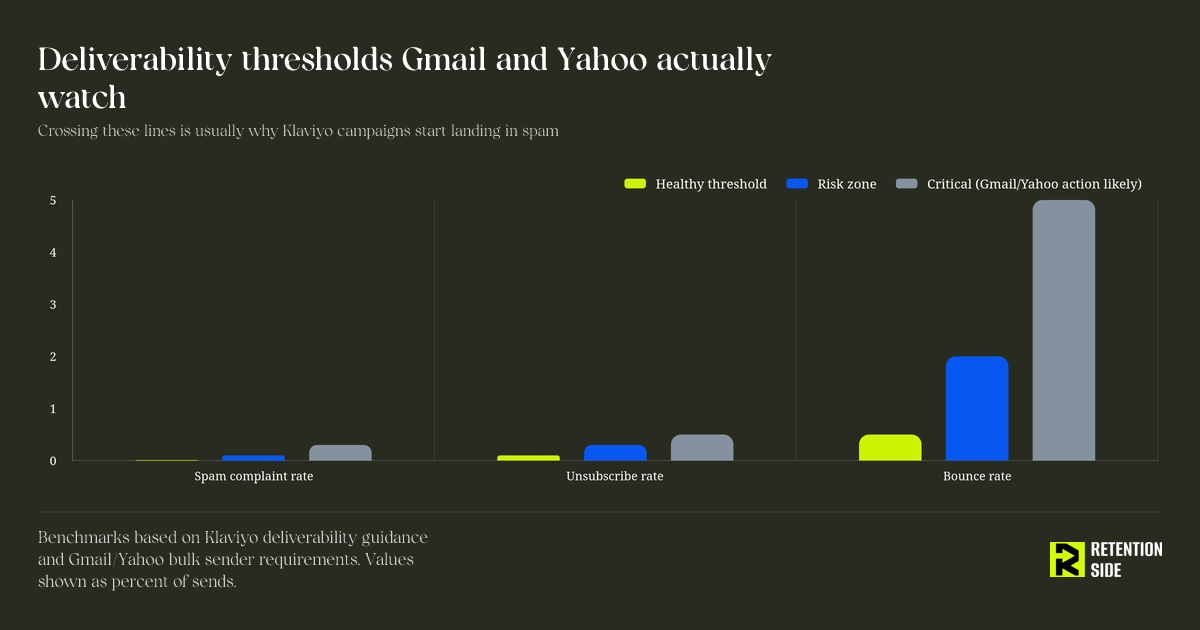
Notice how small these numbers are. A 0.3% spam complaint rate sounds negligible, but on a 50,000-person send that’s 150 people actively telling Gmail they don’t want your mail. Multiply that pattern across a few campaigns a week and you’ve trained Gmail’s filters to distrust your domain.
Why your Klaviyo emails are actually going to spam
Once you understand sender reputation, the specific root causes on Klaviyo accounts tend to fall into a short list. We rarely see a brand with only one of these problems. Usually it’s two or three compounding each other.
1. No branded sending domain, so DKIM never aligns with your From address
Out of the box, Klaviyo sends on a shared domain and signs mail with klaviyomail.com, not your brand’s domain. Gmail shows “via klaviyomail.com” next to your sender name, and DMARC alignment fails because the DKIM signing domain doesn’t match your From address. Since Google and Yahoo’s February 2024 bulk sender requirements, this misalignment matters more than it used to. Klaviyo recommends any account over roughly 5,000 profiles set up a branded sending domain with DMARC specifically to avoid Yahoo and Gmail performance disruptions.
This is the single most common technical issue we find when auditing a new client’s Klaviyo account. It’s also one of the easiest to fix and one of the most overlooked, because the emails still send and still show as delivered. Nothing in the dashboard screams “broken” until you check inbox placement.
2. You turned on a branded domain, then blasted full volume immediately
Ironically, fixing the domain issue can create a new problem if you do it carelessly. A brand-new sending subdomain has zero reputation with Gmail and Yahoo. Flip it on and send to your entire list on day one, and inbox providers see an unfamiliar domain suddenly sending high volume, which is exactly the pattern spam operations exhibit. The domain needs to warm up: start with your most engaged 30 to 60 day openers and clickers, then widen the audience over two to four weeks.
3. Shopify sync is feeding Klaviyo profiles that never actually opted in
Shopify’s integration syncs customer profiles into Klaviyo in real time, including buyers who never subscribed to marketing and legacy “Accepts Marketing” imports from before Shopify tightened its subscription model. If your campaign targets a raw list instead of a properly built segment, you end up mailing stale, never-engaged, and sometimes never-consented addresses. That drives bounces and complaints simultaneously. The fix is building your default campaign audience as a segment that combines consent status with recent engagement, not a static list.
4. No sunset flow, so dead profiles keep dragging the account down
Klaviyo does not remove unengaged profiles on its own, and you keep paying to message them. Profiles with no opens or clicks in 90 to 180 days are the most likely to complain or decay into spam trap addresses. Without a sunset flow that suppresses non-responders after a final win-back attempt, these dormant profiles quietly suppress your entire domain’s reputation.
5. Content and template issues that add unnecessary risk
These matter less than reputation and infrastructure, but they still contribute: broken rendering across clients, excessive image-to-text ratio, misleading subject lines, missing or hard-to-find unsubscribe links, and third-party or affiliate-style URLs that inbox providers flag as suspicious. None of these alone usually tanks deliverability, but combined with a reputation problem, they accelerate it.
How to fix Klaviyo deliverability issues step by step
Fixing this isn’t about one silver bullet. It’s a sequence, and the order matters because some fixes only work once the previous one is in place.
Set up a branded sending domain and publish DMARC. In Klaviyo, go to Settings > Domains and add your domain. This aligns DKIM to your actual From domain instead of klaviyomail.com, and lets you publish a DMARC record starting at p=none so you can monitor before enforcing. This is the foundation everything else builds on.
Warm the new domain deliberately. Don’t send your full list on day one. Start with recently engaged subscribers and expand gradually over two to four weeks.
Build and suppress a never-engaged segment. Klaviyo’s Deliverability Hub makes this straightforward: create a segment of profiles with no opens, clicks, or purchases over a defined window, run one last win-back attempt, then suppress non-responders. This single move often has the biggest impact on inbox placement of anything on this list.
Rebuild your campaign targeting around consent plus engagement, not raw lists. Especially if Shopify sync is feeding your account. A segment, not a static list, should be your default campaign audience.
Set up dedicated click tracking under your own domain. This keeps every trackable link aligned to your brand rather than a shared Klaviyo tracking domain, reinforcing trust signals across the whole message.
Monitor Google Postmaster Tools if Gmail is a meaningful share of your list. Klaviyo’s own complaint reporting understates reality because most inbox providers don’t share complaint data back to ESPs. Postmaster Tools gives you the real number for Gmail specifically.
Reassess sending frequency by engagement tier. More than one email per inbox per day is risky for anyone. Highly engaged segments can often handle more frequent contact; dormant segments should get almost none until they’ve re-engaged or been suppressed.
Recovery is rarely instant. Here’s a realistic shape for what improvement looks like after a proper cleanup and domain fix:
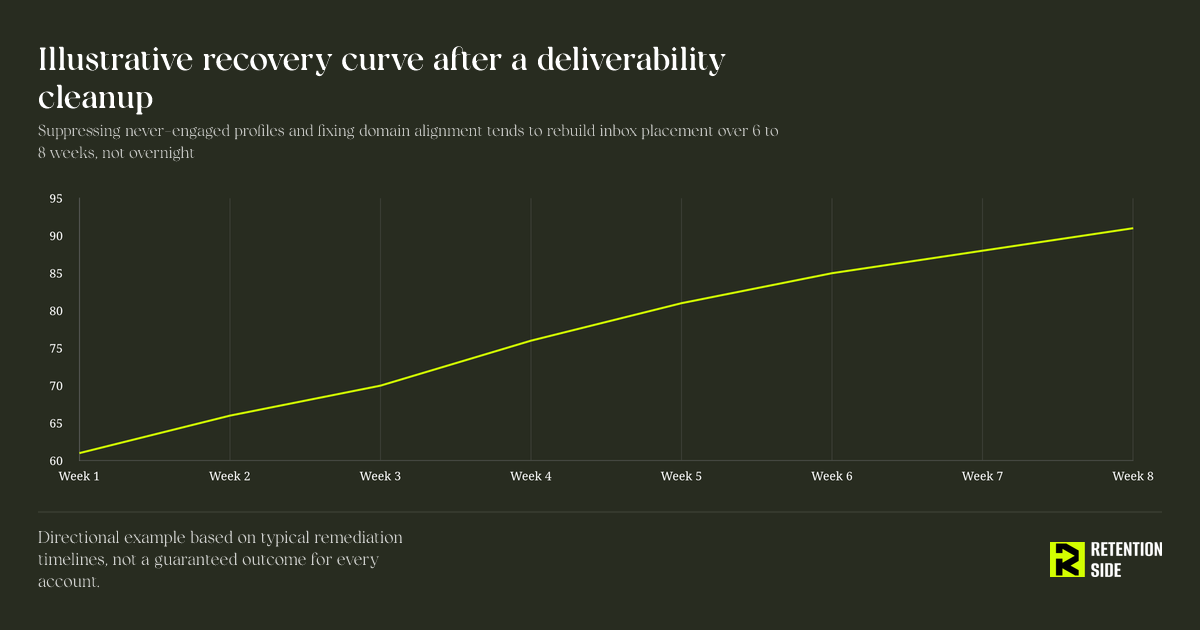
If you’re expecting a fix on Monday and a clean inbox by Wednesday, recalibrate. Sender reputation is built and rebuilt over weeks of consistent behavior, not a single settings change.
Why Klaviyo might be skipping emails, and why that’s a different problem
“Skipped” and “spam” get confused constantly, but they’re not the same failure mode, and mixing them up leads to fixing the wrong thing.
A skip means Klaviyo never attempted to send the message at all. Spam placement means Klaviyo sent it and the inbox provider routed it away from the primary inbox. If your flow or campaign report shows a high skip count, the cause is almost always one of these:
- Smart Sending. This caps how often someone can receive a message on a given channel within a set window, 16 hours for email by default. If you run frequent campaigns alongside active flows like abandoned cart or browse abandonment, profiles who just received a campaign will get skipped from a flow message triggered in the same window. This is expected behavior, not a deliverability failure, but it can quietly suppress flow revenue if you don’t account for it when planning campaign cadence.
- Suppression. Someone unsubscribed, marked a previous email as spam, or hard bounced. Klaviyo will not send to them again to protect your reputation, which is the system working as intended.
- Flow filters. The profile no longer matches the conditions set on that flow message at send time, such as an abandoned cart flow correctly skipping someone who already completed the purchase.
- Suspicious email flag. If an address has hard bounced anywhere across Klaviyo’s infrastructure, even in a different account, it’s marked suspicious and automatically skipped in your account too.
- Missing or invalid email, syntax errors in the template, or account sending limits. Less common, but worth checking in the recipient activity tab before assuming a deliverability issue.
If you’re seeing skips, check the skipped reason inside the message’s recipient activity tab before assuming anything is wrong with deliverability. High skip counts in something like an abandoned cart flow are often healthy, since everyone who checks out gets correctly skipped. High skips in a welcome flow because of Smart Sending overlap with campaigns is a scheduling issue, not a spam issue, and the fix is spacing out campaign sends or turning off Smart Sending on that specific message.
Did Klaviyo get hacked?
No, and this question usually comes from a misunderstanding rather than an actual breach. When brands see a sudden drop in performance, a spike in bounces, or unfamiliar sending behavior, “did Klaviyo get hacked” is a natural first thought. But Klaviyo as a platform hasn’t experienced a breach that would explain deliverability problems showing up in individual accounts.
What actually happens more often is one of these:
- A team member’s Klaviyo login credentials were compromised (usually through a phishing attempt or reused password), and someone accessed the account and sent unauthorized campaigns. This is an account-level security issue, not a Klaviyo platform hack, and it’s why enabling two-factor authentication on every Klaviyo user is non-negotiable.
- An integration or app connected to Klaviyo malfunctioned or was misconfigured, triggering unintended sends or profile updates that look like unauthorized activity.
- Klaviyo’s own anti-abuse system flagged unusual sending patterns and temporarily disabled the account. This isn’t a hack, it’s Klaviyo protecting its shared sending infrastructure (and every other customer on it) from accounts that look like they’re being abused, often triggered by a new account mailing an uploaded list too aggressively.
If you suspect unauthorized access, check Klaviyo’s account activity log for logins and sends you don’t recognize, rotate passwords, enable 2FA immediately, and review connected integrations for anything unfamiliar. That’s a security response, and it’s a separate conversation from the deliverability issues covered in the rest of this article, even though both can produce similar symptoms of “something is wrong and I don’t know why.”
Frequently asked questions
Why are my emails automatically going to spam?
Almost always because your sender reputation has degraded on the specific domain or IP you’re sending from. Inbox providers evaluate engagement, spam complaint rate, unsubscribe rate, bounce rate, and sending volume to decide whether your mail is trustworthy. If you’re seeing consistent spam placement rather than an occasional stray email, look first at whether you have a branded sending domain with aligned DKIM and DMARC, whether you’re still mailing a never-engaged segment that’s been dormant for months, and whether a recent list import or Shopify sync introduced non-consented or low-quality addresses into your sending audience. Sudden spam placement after a change, like a new integration, a purchased list, or a volume spike, points to that change as the trigger. Gradual, creeping spam placement over months usually points to accumulated dormant subscribers dragging your reputation down over time.
How do I stop the emails I send from going to spam?
Work through it as a sequence rather than trying everything at once. Start with infrastructure: set up a branded sending domain in Klaviyo, publish DMARC, and confirm DKIM alignment on a live test send. Then address list health: build a never-engaged segment, run a final win-back, and suppress non-responders so Klaviyo stops mailing addresses that are dragging your reputation down. Rebuild your campaign audiences as engagement-based segments instead of raw lists, especially if Shopify sync is a factor. Keep spam complaints under roughly 0.1% and unsubscribe rates under 0.3% by matching content to subscriber expectations and making the unsubscribe link genuinely easy to find. If you recently activated a branded domain, warm it gradually rather than sending full volume immediately. And if Gmail is a meaningful portion of your list, set up Google Postmaster Tools, since it will show you the real spam complaint rate that Klaviyo’s own reporting likely understates.
Did Klaviyo get hacked?
No. Klaviyo as a platform has not had a breach that would explain individual accounts suddenly having deliverability or sending problems. What typically happens is either an individual account’s login credentials were compromised, an app or integration connected to the account malfunctioned, or Klaviyo’s anti-abuse system flagged and temporarily disabled the account due to sending patterns that resembled abuse, often from a new account mailing an uploaded list too aggressively. If you notice unauthorized campaigns or profile changes, check the account activity log, rotate passwords, and enable two-factor authentication immediately. That’s an account security response, separate from the deliverability issues that cause emails to land in spam.
Why is Klaviyo skipping emails?
Skipping and spam placement are different problems. A skipped email was never attempted, most commonly because of Smart Sending (the recipient already received a message on that channel within the set window, 16 hours by default for email), suppression (they unsubscribed, complained, or hard bounced previously), flow filters that no longer match at send time, or a suspicious email flag from a hard bounce anywhere on Klaviyo’s infrastructure. Check the skipped reason inside the message’s recipient activity tab rather than assuming it’s a deliverability failure. High skips in something like an abandoned cart flow are usually healthy, since people who complete checkout are correctly skipped. High skips from Smart Sending overlapping with frequent campaigns is a scheduling issue you can fix by spacing out sends or disabling Smart Sending on that specific flow message.
Why this matters beyond email
Deliverability isn’t just an email metric. It’s the trust layer underneath every retention channel you run. If your domain has a damaged sender reputation, that same erosion of trust affects how your brand shows up across the customer relationship, not just in a single campaign’s open rate.
This is part of why we think about retention as a system rather than a single channel. Email is almost always the starting point because Klaviyo gives you the infrastructure to act on behavior in real time, but a brand with damaged email deliverability is a brand that needs to lean harder on SMS, push notifications, or even direct mail while the email domain rebuilds trust. Diversifying channels isn’t just about reach or cost efficiency, it’s also a hedge against exactly this kind of single-channel fragility. A brand running email, SMS, and a loyalty program in parallel doesn’t lose all lifecycle revenue when one channel’s deliverability takes a hit.
It also means the fix for “my emails are going to spam” is rarely a copywriting fix. We’ve seen brands rewrite subject lines for months while the actual problem sat in their DNS records or their never-engaged segment. Diagnosing the real cause, whether it’s infrastructure, list hygiene, or content, before applying a fix is what separates a brand that recovers in six weeks from one that’s still guessing six months later.
Conclusion
Klaviyo emails going to spam is almost never a mystery once you separate delivery from deliverability and work through sender reputation systematically. Start with infrastructure: a branded sending domain, aligned DKIM, and a published DMARC record. Then address list health: suppress the never-engaged, rebuild campaign targeting around consent and engagement, and keep spam complaints and unsubscribe rates below Klaviyo’s recommended thresholds. Treat skipped emails as a separate diagnostic question from spam placement, since Smart Sending and suppression explain most skips and usually aren’t a sign anything is broken.
None of this happens overnight, and that’s the part most brands underestimate. Sender reputation is a trailing indicator of months of sending behavior, so rebuilding it takes weeks of consistent, disciplined sending, not a single settings change. But it is fixable, and it’s usually the highest-leverage fix available to a brand whose email revenue has quietly stalled, because every other retention channel you build performs better once the inbox trusts you again.